
Raven 2 Familiar System Guide: Summon, Equip, and Awaken
Familiars are companions that provide summon stats to support your character’s growth. To acquire more Familiars or re-summon higher-grade ones, you may need to buy Raven 2 Crystal as part of the summoning process. This guide explains how to manage, summon, awaken, and benefit from your Familiars in Raven 2.
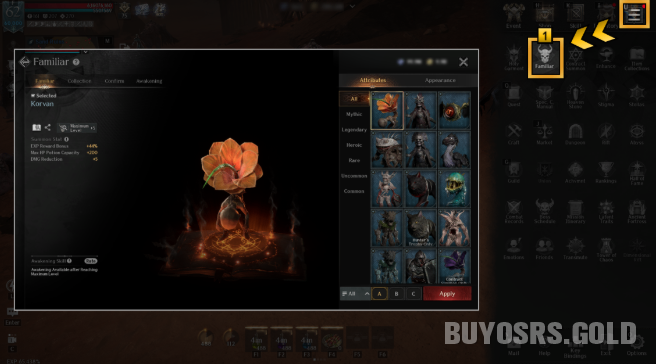
Accessing the Familiar System
Open the main menu (☰) and select Familiar.
1. Familiar Menu Overview
Viewing Familiar Information
You can view your current Familiar’s name and stats.
When you select a Familiar from the list, you’ll also see its name and stats.
A preview of the selected Familiar’s appearance is available.
Attributes vs. Appearance
In the [Attributes / Appearance] tabs, you can equip or switch Familiars:
Attributes tab: Only the stats of the selected Familiar apply.
Appearance tab: Only the look of the Familiar applies.
If no appearance is selected here, the Familiar from the Attributes tab will be shown.
Managing Your List
View Familiars sorted by grade.
Use search filters to show owned or not-owned Familiars.
Presets & Sharing
Save Familiars as presets (A / B / C) from the Attributes/Appearance tab.
Select a Familiar and press Apply to equip it.
Press the Share button to send Familiar info to chat.
2. Familiar Collection
Unlock special effects by collecting Familiars and completing collections.
Use [Collection Progress / Collection Stats] tabs to view collection bonus details.
Tap the ☆ button to add a collection to Favorites.
Favorite information is saved per server.
3. Familiar Confirm (Post-Summon)
When you summon a Heroic-grade or higher Familiar, it goes to the [Confirm] tab first.
Confirm to obtain the Familiar.
Re-summon using Crystals to get a different Familiar of the same grade.
For Heroic & Legendary: Re-summon cost increases up to 5 times, then stays fixed.
For Mythic: Cost does not increase.
If the timer expires, the last summoned Familiar is automatically confirmed.
Pickup System
View your selected pickup list.
Pickup targets have an increased summon rate, which improves with each remaining re-summon attempt.
You can select up to 3 pickup Familiars.
4. Familiar Awakening
Enhance Rare to Mythic grade Familiars in the [Awakening] tab.
The Familiar’s level is shown at the top-right of each Familiar in the list.
Once a Familiar reaches max level, you can apply an Awakening Skill.
Awakening has a chance to succeed or fail.
Success: Grants an Awakening Skill based on probability.
Change Skill: You can change the Awakening Skill of an awakened Familiar. If it fails, the skill remains unchanged.
Familiars of a certain grade or higher can gain exclusive Familiar skills through Awakening.
When an exclusive skill activates, the
Important: Additional stats and skills from growth and awakening apply only when the Familiar is equipped.
5. Familiar Summon
Obtain Familiars using Summon Scrolls (varies by grade).
Where to Get Scrolls
Shop purchases
Events
Quests
Special Corps level rewards
Summoning Methods
In the shop’s [Summon] and [Exchange] tabs, summon using:
Crystals
Gold
Coins
Duplicate Familiars
If you summon a Familiar you already own, you receive Shards of Contract of the same grade instead.
Check your current Shards in the [Contract Summon] menu.
For usage details, refer to the Contract Summon Guide.
Quick Tips
Always equip a Familiar in the Attributes tab for stat bonuses.
Use the Appearance tab if you like a different Familiar’s look.
Save presets to quickly switch between setups.
For high-grade summons, use re-summon strategically before the timer expires.
Awaken only when you have spare materials — success is not guaranteed.
Master your Familiars, and they will powerfully support your journey through Raven 2! If you're looking to acquire cheap Raven 2 Crystal, you can visit MMOEXP to get the best value for your summoning needs.
